
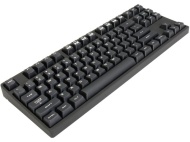

Cooler Master SGK-4000-GKCC1-JP

Cooler Master SGK-4000-GKCC1-JP
alaScore 89

24 reviews

May, 2013

alaTest has collected and analyzed 24 reviews from magazines and websites. People are impressed by the size and design. The build quality and value for money also get good feedback, but there are some mixed comments about the usability.

value for money, build quality, design, size

We analyzed user and expert ratings, product age and more factors. Compared to other Keyboards the Cooler Master SGK-4000-GKCC1-JP is awarded an overall alaScore™ of 89/100 = Very good quality.

Review analysis

(Based on 24 reviews)

User Reviews  

Showing 24 review(s)

Expert Reviews User Reviews
Showing 1 - 10 of 24 Show Reviews: in English

Consumer review by:

Backspace stopped working


It has been more than 30 days so now I have to deal with the manufacturer.

Great feel. Love the switches also good price

Backspace key was acting up then stopped working completely

Consumer review by:

excellent compact keyboard


I have a Corsair K60 kb at home which has cherry mx reds and I am tempted to replace with this one!

I ordered this for work. As a developer I use my keyboard quite a bit and I am starting to get some RSI ; The keyboard is nice and heavy and the brown switches feel great. I'm sure after some practice of typing lighter I will become faster and have...

something I didn't know before ordering was the context menu key (right click) I was used to using (normal on many keyboards) was replaced with a Fn key which is used to access multimedia actions

Consumer review by:

Glad I picked this one


Cherry Brown keys feel so sweet. No clicky noise to deal with, but great sound and feel ; Small footprint is a great boon for my cramped desk ; Construction of the keyboard is solid. I think this is a great deal for the price ; Replaceable keys is...

Need to get a wrist wrest, would be nice to have an option to have a modular wrest. Oh well ; Might be cool to have it backlit, but no big deal ; I've read the reviews about the usb connection to the board itself so I plan to never mess with that

ADVERTISEMENT

Consumer review by:

Win key failed...


I like this keyboard, but the left Windows key failed after just 3 months...

Solid heavy keyboard ; Braided cable ; Key font is stylish ; Media keys through function button, better than no media keys

Detachable cable, both awesome, and a curse. If you ever want to use this on your lap, don't, the connector won't stay in as well since the cable isn't in the slit that keep the connector from falling out ; Left Win key failed after 3 months, and...

Consumer review by:

amazing product


This keyboard to me is absolutely fantastic. I've owned other keyboards, mainly membrane, and I hated it. Once I started to read about Cherry MX Switches I noticed that keyboard from back in the day used cherry switches, and they are starting to make a...

High Quality Materials, the keyboard feels very solid. It also has a very heavy feel, which is from high quality components. It doesn't feel cheap at all. Even the usb cable is very high quality. Sure its stiff but its still malleable enough to route...

The cable management that's built into the back of the board could use some change. It doesn't work as I thought it would. I route my keyboard to the left of my monitor and the mouse to the right. So using the cable routing to make sure i don't yank it...

Consumer review by:

Great Keyboard with Some Risks


I received this as a gift for Christmas. It's a great keyboard and I LOVE the Cherry MX Reds for gaming, coming from a Cherry MX Blue keyboard was very nice. This keyboard didn't look like the one in the pictures: There are no Coolermaster markings or...

Rubberized housing looks/feels cool ; The small size but big readable characters is awesome ; MX Red switches are an improvement for me over Cherry MX Blues ; Includes keycap remover and red WASD keys to swap out if you choose ; Mine also did not have...

The Delete, INS, Home, End, and Del keys were sticky when I got it ; I had to remove some keys and clean them out with ISO alcohol to get them to work properly, instructions in Other Thoughts ; The removable mini USB cord could present issues in the...

Consumer review by:

Back to the 80's


The CLACK CLACK takes me back to the late 80's. I feel like I am in a typing pool!! LOL CLACK CLACK. I enjoy it when everyone within 2 blocks knows when I am typing, especially my wife in the next room when she is trying to sleep! CLACK CLACK Also...

Great CM quality ; You get what you pay for , at least sometimes, which makes me feel smart

Not really a con, but I ACTUALLY wanted all of the COOL CM logos but instead this unit came with only a few removable keys with the Older Cooler Master LOGO ; All of the other logos folks have complained about are not present on this keyboard. You...

Consumer review by:

Avoid


Cheap

Cheap and you will pay for that ; My first board had it's left ALT key fail. And now, the replacement board has a heavy "ping" noise every time you use a key. Incredible annoying ; Go with a Filco or a Rosewill. Mechanical keyboards is not something...

Consumer review by:

Keys only somewhat responsive


Mechanical, tenkeyless, came with some replacement keys and key puller. The USB cable is detachable and of high quality. There is a satisfying strike while playing games and it is not too clicky. Volume control with the function key is useful and works...

Backspace and ESC keys are pretty unresponsive. Actually many of the keys are unresponsive when you need to press the same key quickly. I don't really notice the problem in many of my games, however, such as TF2. The price has also dropped dramatically...

Consumer review by:

Right keyboard, wrong keys.


Many keys do the same thing with a different secondary function ex. '\|' labeled as (> and <) next to left shift. '\|' labeled as (} and ç) next to enter key. another example that isn't as major is the '9' ans '0' keys. They are labeled as '9 and...

It's definitely cherry brown and feels great ; I'd upload a picture, but no camera. Sorry

It also doesn't look exactly like the picture as in it doesn't have the storm keys where the window keys are and it doesn't have CMSTORM above the directional keys or quickfire on the space-bar ; It came with keys that have three printed symbols and...

Product Specifications

Configuration

Calculator Functionality: No
Chip Card Reader: No
Flexible Keyboard: No
Integrated Cursor Control: No
Magnetic Card Reader: No
Numerical Block Included: No
Remote Control: No
Separate Mouse Included: No
USB:USB 2.0
USB Hub: No
Voice Control: No

General Features

Platform:PC / Mac
Supported Console:Not Applicable
Type:Keyboard
Type of Connection:Cable
etilize