

Genius, KYE Systems 31310427101

Genius, KYE Systems 31310427101
alaScore 82

13 reviews

May, 2013

  • No negative mentions yet

alaTest has collected and analyzed 13 reviews from magazines and websites. Reviewers are impressed by the build quality. The usability is also appreciated.

value for money, usability, build quality

We analyzed user and expert ratings, product age and more factors. Compared to other Keyboards the Genius, KYE Systems 31310427101 is awarded an overall alaScore™ of 82/100 = Very good quality.

Review analysis

(Based on 13 reviews)

Expert Reviews  

User Reviews  

Showing 13 review(s)

Expert Reviews User Reviews
Showing 1 - 10 of 13 Show Reviews: in English | in other languages (3)

Expert review by:

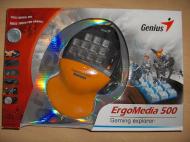
Genius Ergo Media 500


Genius, a computer peripheral manufacturer, has recently sent us their ErgoMedia 500 Game Pad. From the first glance, this device seems to be well designed and looks as if it would be comfortable. Genius says that the "ErgoMedia 500 is a gaming key...

For testing of this gaming device, I played the new smash hit Bioshock. Using the device at first seemed a little weird. This is because for as long as I can remember I have used the a, w, s, d keys to move around while playing fps. I figured I would...

Expert review by:

Genius ErgoMedia 500


From the first glance, this device seems to be well designed and looks as if it would be comfortable.? Genius says that the ?ErgoMedia 500 is a gaming key pad that turns you into the best game player with the most clear and simple settings that you can...

Backlighting keycap function for late-night gaming sessions

Consumer review by:

Amazon review summary for the Genius, KYE Systems 31310427101


alaTest has collected and analyzed 4 user reviews of the Genius, KYE Systems 31310427101 from Amazon.com. The average user rating for this product is 4.0/5, compared to an average user rating of 4.0/5 for other products on Amazon.com.

value for money

75% of reviews on Amazon.com give this product a positive rating.

ADVERTISEMENT

Consumer review by:

Good Keyboard for games and programs.


Good Keyboard for games and programs.

I have used this product for almost six months and I play games but its also good for shortcut keys a number keypad, a lot of different things. Each key can be reprogram with single key, repeat or macros. There also a button on the side so you can...

Consumer review by:

Functional, Easy to use


Functional, Easy to use

I was looking for something inexpensive and basic. The 4-way directional thumb control is pretty cool, and I like how easy it is to bind the top 11 keys and the mouse wheel to any key you can imagine. There are four separate sets of bindings you can...

Consumer review by:

I don't play games, but this is great for Photoshop


I don't play games, but this is great for Photoshop

I use Photoshop keyboard shortcuts a lot, and have several Photoshop actions I've assigned to keys. I've programmed the keys of this pad to enlarge/reduce my brush size and hardness, create an overlay layer, reset the tool I'm using, change to RGB,...

Consumer review by:

Meh


Meh

From the box it hookes up easy, programs like a charm, then..... Macros are iffy to execute and looping is questionable at best. Most my program keys worked just fine, but for some reason on both my xp and vista machine it would not let me trun...

Expert review by:

Review: Genius Ergomedia 500 peripheral


Stay comfortable when gaming

Good points

Editor's Choice!

Expert review by:

Genius ErgoMedia 500 Controller


Today I will be looking at a peripheral from probably one of the most well known manufacturers of peripherals there is, that company is Genius and the peripheral in question is a gaming keypad called the ErgoMedia 500. Before taking a look at the...

Comfortable to use.- Good build quality.- Looks good with the blue leds and blue backlight.- Very easy to install and set-up.- Could easily be used in non-gaming applications.- Reasonably priced at approx £25

Not good in driving games.? Overrides sound card with no instructions on how to disable the ErgoMedia 500's audio / re enable your preferred audio device.? No macro printing ability.

In reality I have only tried the ErgoMedia in 1 game of each genre of game I own, I think its fair to say if it can be used in Infernal and all first person shooters with no issues. What worries me a bit though is the fact that it didn't seem to work...

Expert review by:

Genius ErgoMedia 500 Review


Genius have recently sent us their ErgoMedia 500 gaming keypad, which is aimed at gamers who don't want to spend a lot of money to improve their gaming prowess.

The ErgoMedia 500 is a great product for such a small price tag. It's not without its faults, as the units design needs work and it takes a bit of getting used to, but a useful device for Laptop or Desktop based gamers.

1
2

Product Specifications

The unique hand-shape design of ErgoMedia 500 helps to support your palm for long time playing. Special keycap backlighting makes sure all keys are highly visible even at night; and you can even chat online with the built-in earphone and microphone jacks. Three different game settings help you quickly search for your weapon, equipment, or any desired target.

Header

Compatibility:PC
Manufacturer:Genius
Model:500
Packaged Quantity:1
Product Line:Genius ErgoMedia

Input Device

Buttons Qty:11
Connectivity Technology:Wired
Form Factor:External
Type:Game pad

Miscellaneous

Compatible Game Consoles:PC

System Requirements

OS Required:Microsoft Windows 2000 / XP / Microsoft Windows Vista / Microsoft Windows XP 64-bit Edition
ADVERTISEMENT
ADVERTISEMENT