
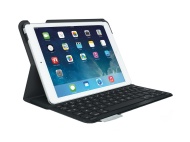

Logitech Ultrathin Keyboard Cover

Logitech Ultrathin Keyboard Cover
alaScore 100

110 reviews

May, 2013

alaTest has collected and analyzed 110 reviews from magazines and websites. People are impressed by the reliability and build quality. The design and usability also get good views. There are some critical reviews about the value for money, while there are some mixed reviews about the size.

usability, design, build quality, reliability

value for money

We analyzed user and expert ratings, product age and more factors. Compared to other Keyboards the Logitech Ultrathin Keyboard Cover is awarded an overall alaScore™ of 100/100 = Excellent quality.

Review analysis

(Based on 110 reviews)

Expert Reviews  

User Reviews  

Showing 86 review(s)

Expert Reviews User Reviews
Showing 1 - 10 of 86 Show Reviews: in English | in other languages (28)

Expert review by:

Logitech Ultrathin Keyboard Cover Review


The Ultrathin Keyboard cover is Logitech's second attempt at an iPad keyboard/case accessory. Its initial offering was in the form of the ZAGG iPad Keyboard Case that might not have been the most affordable accessory for the iPad, as it is an expensive...

The Logitech Ultrathin Keyboard Cover for the iPad is available in both white and black to suit your model. The company claims that the battery pack of the case has enough juice to run for 6 months on a single charge provided you’re using it for about...

Expert review by:

Logitech Ultrathin Keyboard Cover


The Logitech Ultrathin Keyboard Cover is just as light and sleek--and functional--as the iPad itself.

While it doesn't protect the back of your iPad, the $99 Logitech Ultrathin Keyboard Cover is the sleekest keyboard case on the market. Even better, it doesn't sacrifice usability for style. We wish there were a dedicated row of iPad keys, but it's...

Editor's Choice!

Expert review by:

Logitech Ultrathin Keyboard Cover


No one technically needs a keyboard for an iPad. You can type on the screen. But still, it's inefficient. It's not tactile. And that keyboard eats up so much of the iPad's screen space. A dedicated keyboard can help for long-term iPad writing projects.

The Logitech Ultrathin Keyboard Cover has a slim design, fits perfectly onto the iPad 2 and third-generation iPad via magnets, and works extremely well as a keyboard.

The plastic-and-aluminum keyboard isn't really a case, and it doesn't protect the back of the iPad.

Logitech's Ultrathin Keyboard Cover might be the best keyboard accessory ever made for the iPad, if you're looking for a highly portable and functional keyboard that travels light; just make sure you carry a separate protective case.

ADVERTISEMENT

Expert review by:

Logitech Ultrathin Keyboard Cover


Many iPad owners find the onscreen keyboard suitable for their usage, but when it comes to writing long emails or documents, a Bluetooth keyboard is welcome. While you can buy and use any standard Bluetooth keyboard, when traveling with your iPad, not...

Expert review by:

Logitech Ultrathin Keyboard Cover Review


Logitech announced their new 'ultrathin' keyboard case for the iPad back in April, an updated, sexier version of their previously-clunky keyboard case. The...

Well laid-out keyboard ; Very easy to type, good key response ; Use your iPad vertically or horizontally ; Great Build quality ; Great battery life ; Thin, Slim and easy to hold ; It’s also a case ; Uses Bluetooth instead of dock connector

Magents could be stronger ; Letters on keys might not last long ; Somewhat pricey at launch

The high price tag makes you want more from the Logitech Ultrathin Keyboard, but I’d imagine if anyone who buys one of these is going to be very happy with it.

Expert review by:

Logitech Ultrathin Keyboard Cover Review


Since the release of the iPad, I've been searching for a way to completely rid my daily life from laptop use, instead replacing it with a tablet and some sort of physical keyboard. Hardware additions like [...]

Smart magnetic design for the cover flap and as a stand ; Very solid typing experience with low-profile rubber yet clicky keys ; Long battery life that’s rechargeable, and Bluetooth makes it work for all devices

Some of the secondary function keys are useless ; A backlight would have been nice to have

Expert review by:

Review: Logitech Ultrathin Keyboard Cover


Logitech attemps to make iPad keyboards more portable.

Doubles as tough screen protection when not in use ; Easy to transport, thin ; Quiet keys, comfortable layout ; Handy iOS shortcuts ; Sturdy, magnetically-locked iPad stand ; Matches iPad's design aesthetics

Doesn't protect iPad's back ; May not work with some rear shells ; Adds significant weight when attached ; Too heavy to treat as folding lid ; iPad may tip forward at extreme angles

One of the iPad's main weaknesses has always been productivity. It's not a question of apps; while it has taken a little time for a native iPad library to develop, there's usually been some way of getting essential tasks done. It's that even with tho

Consumer review by:

"Excellent fit, finish, appearance, and battery life."


This is the best iPad keyboard case that I have used for my white iPad (3rd generation). I use the keyboard for typing emails and letters as well as for editing documents. Overall, I am very impressed with the keyboard. The magnets function well for...

Fit, appearance, bluetooth connectivity, keystroke feedback

Magnets not secure for portrait mode and may not hold in place when carrying closed

Consumer review by:

"Great product with one major drawback"


Overall good product but it was annoying having to take out my back cover each time I wanted to put the

Sleek design

Attachment only on one side. Back covers are not compatible, can not fit into the stand but I recently found Luvvitt Gorilla Skin aluminum colored back protector which is compatible with this product. Looks great ad can fit into the stand.

Consumer review by:

"hmdth gjnhdg nb"


fgjndrthjn gggjn

gfjmnrthmjn hmdhmghnmthh

ghjrjth bfhmth

Product Specifications

Configuration

Calculator Functionality: No
Chip Card Reader: No
Flexible Keyboard: No
Integrated Cursor Control: No
Magnetic Card Reader: No
Numerical Block Included: No
Remote Control: No
Separate Mouse Included: No
USB: No
USB Hub: No
Voice Control: No

General Features

Platform:Webbook
Supported Console:Not Applicable
Type:Keyboard
Type of Connection:Bluetooth
etilize