

Visit our Business Solutions website >>

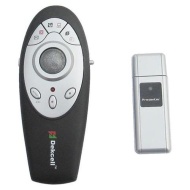
Dekcell 2.4GHz Multimedia Wireless Presenter with Trackball Mouse, Laser Pointer

Dekcell 2.4GHz Multimedia Wireless Presenter with Trackball Mouse, Laser Pointer
alaAverage 4

5 reviews

Jun, 2013

alaTest has collected and analyzed 5 reviews from magazines and websites. People are impressed by the design, whereas many are critical about the value for money.

design

value for money

On average, users rate this product 80/100.

Review analysis

(Based on 5 reviews)

User Reviews  

Showing 6 review(s)

Expert Reviews User Reviews
Showing 1 - 6 of 6 Show Reviews: in English

Consumer review by:

Amazon review summary for the Dekcell 2.4GHz Multimedia Wireless Presenter with Trackball Mouse, Laser Pointer


alaTest has collected and analyzed 4 user reviews of the Dekcell 2.4GHz Multimedia Wireless Presenter with Trackball Mouse, Laser Pointer from Amazon.com. The average user rating for this product is 4.0/5, compared to an average user rating of 4.0/5 for other Mouse & Pointing Devices on Amazon.com.

50% of reviews on Amazon.com give this product a positive rating.

Consumer review by:

Pretty Nice


Pretty Nice

Nice design, works pretty well, all things considered. The mouse track ball is a little touchy and feels a little loose in it's slot, but I got used to it quick enough. Overall, not a bad product, and better than a few others I've tried that cost more.

Consumer review by:

meh.


meh.

When it works, it works well. Like other buyers, it freqently disconnects and I have no choice but to remove the battery to reset it. And i'm only using it 10 feet away.

ADVERTISEMENT

Consumer review by:

This Presenter Rocks!


This Presenter Rocks!

This little presenter has more features than any other one I've ever seen. It even has an A1/A2 switch that doubles the capacity of each button on the controller. The trackball is smooth and makes controlling the mouse a breeze. My only problem with...

Consumer review by:

Input Sensitive


Input Sensitive

Very sensitive cursor movement. Sometime unit shuts-off when in use. Then to reset, you must take out a battery and return (reset power), sometimes repeatedly. also, unit will not shut down without depleting battery when not in use. When its not in...

Consumer review by:

Gary


Item works very well. Easy to operate. Only bad thing is operators manual is only in Chinese.

ADVERTISEMENT
ADVERTISEMENT