
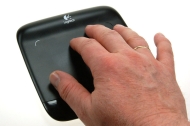

Logitech Wireless Touchpad

alaTest has collected and analyzed 34 reviews from magazines and websites. Opinions about the reliability and design are overall positive. The build quality and usability also get good reviews, whereas many are negative about the value for money.

usability, build quality, design, reliability

value for money

We analyzed user and expert ratings, product age and more factors. Compared to other Mouse & Pointing Devices the Logitech Wireless Touchpad is awarded an overall alaScore™ of 90/100 = Excellent quality.

Review analysis

(Based on 34 reviews)

Expert Reviews  

User Reviews  

Showing 28 review(s)

Expert Reviews User Reviews
Showing 1 - 10 of 28 Show Reviews: in English | in other languages (9)

Expert review by:

Logitech Wireless Touchpad


There does seem to be SetPoint configuration software available for the Wireless Touchpad, but it's unclear if it will be as extensive as customizing your own gestures or as basic as setting the cursor's sensitivity.

Expert review by:

Logitech Wireless Touchpad Review →


The largest touchpad for Windows offers smooth tracking and a frictionless feel, but is ultimately hurt by a lack of certain key multi-touch gestures.

Smooth tracking performance ; Oversized discrete buttons ; All gestures can be used without drivers

Lacks pinch-to-zoom, rotate ; Lacks two and three finger taps, clicks ; Cannot be paired with Bluetooth ; Uncomfortable for extended use

Expert review by:

Logitech Wireless Touchpad


If you've used any its recent devices, you know that Apple has been a driving force behind multi-touch technology in its products. From the Apple iPhone to the iPad to the touch pads that have been on its MacBook Pros for years, the company has been a...

Supports multi-touch gestures ; Smooth response ; Physical, not virtual, buttons

Driver download highly recommended ; Surface of pad isn’t as smooth as the glass on Apple's Magic Trackpad ; Tiny USB receiver is easily lost

Although constrained by the limits of Windows, the Wireless Touchpad does a nice job of bringing the touch-pad experience to desktop PCs.

ADVERTISEMENT

Expert review by:

Logitech Wireless Touchpad Review


I have been a mouse guy my whole life. I have had a contentious lifelong relationship with the touchpad on my laptops and have always gravitated to the mouse. I tried several trackball devices over the years thinking that perhaps I was missing...

Good build quality ; Dead-simple to install ; Sexy design (yes, I said sexy)

5-inch touch area not big enough ; Needs more gestures

Expert review by:

Logitech Wireless Touchpad Review


Before reviewing the MacBook Air, I hated trackpads. It's just a technology that I feel never really cemented itself with us, as human beings, because it requires touch, and every touch is different. A very dry [...]

Solid design, tactile buttons, comfortable to use for long periods on the couch or at a table ; It works just right! Wireless signal is strong at a distance of 20

Windows 7 isn’t suited for touch-sensitive gestures; no OS X support ; Trackpad square has no tactile bounds, its too easy to slide a finger off the sensitive portion

Consumer review by:

Amazon review summary for the Logitech Wireless Touchpad


alaTest has collected and analyzed 17 user reviews of the Logitech Wireless Touchpad from Amazon.com. The average user rating for this product is 3.5/5, compared to an average user rating of 4.0/5 for other products on Amazon.com.

53% of reviews on Amazon.com give this product a positive rating.

Consumer review by:

Makes Windows 8 better


Very useful to make a non-touch screen PC behave more like a Windows 8 multi touch equipped PC. Seems well made, wireless and rechargeable so if for example, you are watching your PC on a TV, you can walk around the room and control the PC. Still...

Consumer review by:

Novel but Not an Essential for Windows 8


Pros: The surface of the pad feels better than anything I've used on a laptop. It's a smooth charcoal grey backed glass that you'll want to touch. The size of the pad is also just right for my desk being about 50% wider than my palm. It recharges using...

Consumer review by:

Great for casual/business Windows 7/8 user. Absolutely useless for gamers.


Just picked this up @ Best Buy on Black Friday. Have tried it with my non-touch screen windows 8 laptop and it GREATLY increases the Windows 8 user experience over just having a mouse alone... Tempted to keep it just for that, but I'm getting rid of...

Consumer review by:

Works well with Windows 7, except click-and-drag for now*


Engineering-wise this is a beautiful device.. - Large but thin - Very precise cursor navigation - Smooth matte glass-like surface, nice construction - Battery lasts a long, long time between charges, even when left on - Front feet-mounted buttons...

Product Specifications

Configuration

Built-in Storage Capability: No
Charging Unit Included: No
Force / Vibrate Feedback: No
Read / Write Functionality: No
Scrolling Function: No
Scrolling Type:Not Applicable
Scrolling Wheel: No
USB:USB 2.0
USB Hub: No

General Features

Battery-free Mouse: No
Gaming Product: No
Graphic Tablet with Mouse:Not Applicable
Graphic Tablet with Pen:Not Applicable
Input Registration:Not Applicable
Notebook Mouse: No
Platform:PC / Mac
Type:Touchpad
Type of Connection:Radio Transfer
etilize