
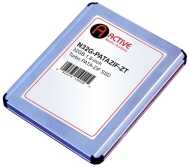

AMP 32GB 1.8" 5mm IDE / PATA Turbo ZIF SaberTooth-ZT SSD

AMP 32GB 1.8" 5mm IDE / PATA Turbo ZIF SaberTooth-ZT SSD
alaAverage 3.2

5 reviews

May, 2013

We have collected and analyzed 5 user reviews from international sources. Users rate it 64/100. The average review date is Jun 28, 2010. We have compared these reviews to 28836 reviews from other Solid-State Drives. Last update: May 23, 2013.

Review analysis

(Based on 5 reviews)

User Reviews  

Showing 1 - 5 of 5 Show Reviews: in English

Consumer review by:

Great little hard drive.


Great little hard drive.

After buying a netbook w/ only 8gb of hard drive space it didn't take long till it was full. That means no disk defrag and good luck if any updates come out. Enter this little honey of a ssd drive. With 32gb of memory there was no problem w/ updates...

Consumer review by:

works fine... and then doesn't anymore


works fine... and then doesn't anymore

Purchased two units, for two ACER One A-110 netbooks. At first, these worked fine. One could regret the fact that the SSD's firmware has a deficient SMART implementation, which makes very difficult following the life and use of the devices through...

Consumer review by:

Horribly Slow


Horribly Slow

I got this to replace the horribly slow 16GB SSD that comes default in the HP Mini 1030NR. After spending $100 in this SSD, I realized that this one was no better! When using Windows, the system momentarily pauses anywhere between 1 second to 5...

ADVERTISEMENT

Consumer review by:

Sabertooth Z did not work with Lenovo U110 (but Sabertooth ZX did)


Sabertooth Z did not work with Lenovo U110 (but Sabertooth ZX did)

I received the Sabertooth Z SSD and installed it on my Lenovo U110. According to the manufacturer's website, this SSD should be compatible with that laptop, but it did not work. Finally I returned it and tried the AMP Sabertooth ZX AMP 32GB SaberTooth...

Consumer review by:

This is the SSD solution for Thinkpad X40 / X41 along with an Addonics adapter


This is the SSD solution for Thinkpad X40 / X41 along with an Addonics adapter

Combiend with the Addonics adapter Toshiba 1.8 Zif 2.5 Ide Connector this SSD fits nicely into your X40 / X41 but you'll have to remove the keyboard and palmrest to reliably fit it. Assuming you're the worldwide wizard with tweezers and needle nose...

ADVERTISEMENT
ADVERTISEMENT