

alaTest USA - Product Tests & Reviews

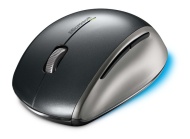
Microsoft Explorer Mouse Reviews

Mouse - optical - 5 button(s) - wireless - 2.4 GHz - USB wireless receiver - silver, anthracite - OEM (pack of 3 ) More product details

$38.21

New BlueTrack mouse sensor works on almost any surface ; well-designed rechargeable base station... (cnet.com)

Solid feel ; good tracking reliability ; efficient battery recharging (macworld.com)

alaTest Review Summary for Microsoft Explorer Mouse

We have collected and analyzed 23 expert reviews and 61 user reviews from international sources. Experts rate this product 77/100 and users rate it 83/100. The average review date is February 17, 2009. We have compared these reviews to 85903 reviews from other Mouse & Pointing Devices. The alaScore™ for this product is 97/100 = Excellent. Last update: November 21, 2009.

alaSCORE 97

970100

84 reviews

November, 2009

77 / 100

23 Experts

Product Age

old
new

83 / 100

61 Users

Trend

Rank  6

from $38.21

Expert Reviews (23)

US

Microsoft Explorer Mouse

By (cnet.com)

New BlueTrack mouse sensor works on almost any surface ; well-designed rechargeable base station ; included rechargeable battery ; snap-in USB receiver

No dpi toggle button ; mushy scroll wheel

The Microsoft Explorer Mouse deserves your attention for its BlueTrack sensor technology that lets you use it on surfaces where other mice fail. Laptop owners, or anyone else who uses a nondeskbound computer, will benefit from Microsoft's innovative ...

Had Microsoft introduced the Explorer Mouse two years ago, we might have...

Rating

83100

Partner Source
cnet.com
US

Review: Microsoft Explorer Mouse

By Blair Hanley Frank (macworld.com)

The Explorer Mouse is a solid mouse. If you're constantly working on non-standard surfaces, then the Explorer Mouse is probably right for you.

Solid feel ; good tracking reliability ; efficient battery recharging

Finicky scrolling ; awkward left-hand use

They might seem old fashioned, but trackball mice have one thing going for them: so long as there is a solid surface, you can always use a trackball mouse and it will work. However, when you need high precision tracking and speed, optical and laser ...

Rating

80100

macworld.com
US

Microsoft Explorer Mouse

By Jeremy Atkinson (pcmag.com)

If you're willing to pay the price, you'll get superior tracking on just about any surface (other than mirrored ones or glass) with the Microsoft Explorer Mini Mouse ($80 street), which uses the same new BlueTrack technology as it's bigger relative, ...

Small. Convenient snap-in transceiver. Tracks exceptionally well. Good battery life

Pricey. Not for lefties. Lack of clicky scroll-wheel detents makes line-by-line scrolling difficult

The Explorer Mini Mouse is a good notebook companion, given its portability and tracking system, but you'll have to fork over some bucks for it.

And, as you might suspect, because of its compactness, the mouse isn't all...

Rating

70100

pcmag.com

User Reviews (61)

US

"Very pleased."

By wjb274 (cnet.com)

Excelent design, travel bag, works well on many surfaces

does not work very well on red surfaces

US

"BEST MOUSE EVER!!"

By ctheis (cnet.com)

The best mouse that I have ever purchased. I'... 

Rechargeable with included docking station, Battery Included, Page scroller doesn't have clicking which I like. Mouse has a little weight. Nicely contoured feel. Glides nice on desktop surface

IntelliPoint

US

"Comfortable and LIGHT"

By manny khool (cnet.com)

I've gone through my fair share of laser mice... 

Light, works straight out of the box on Mac (no software necessary) and it's quite comfortable.

A little louder than what I'm used to (clicking) and not quite as smooth on all surfaces (prefers my desktop to a mouse pad).

Manufacturer's Description

The Microsoft Explorer Mouse, with revolutionary Microsoft BlueTrack technology, works more places than ever before, including on granite countertops, carpet - even on a wood table or a rough, unfinished park bench.

Compare Prices

loading...

loading...

Search results - you may continue typing to narrow your search.

loading

loading

loading

loading...