
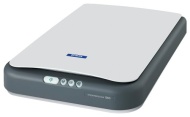

Epson Perfection 1260 Photo

Epson Perfection 1260 Photo
alaScore 78

153 reviews

May, 2013

We have collected and analyzed 6 expert reviews and 147 user reviews from international sources. Experts rate this product 73/100 and users rate it 75/100. The average review date is Jan 23, 2004. We have compared these reviews to 55112 reviews from other Scanners. The alaScore™ for this product is 78/100 = Good. Last update: May 18, 2013.

Review analysis

(Based on 153 reviews)

Expert Reviews  

User Reviews  

Showing 1 - 10 of 72 Show Reviews: in English | in other languages (93)

Expert review by:

Epson Perfection 1260 Photo Flatbed Scanner Reviews


The combination of powerful features, ease-of-use, high quality and affordability with the Epson Perfection 1260 has taken home scanning to new levels

Consumer review by:

unhappy


none

Software bad, patch did not help, no 800 number

Consumer review by:

Epson Driver Doesn't Work on OS X Leopard


Epson Driver Doesn't Work on OS X Leopard

After upgrading to OS X Leopard, the Epson driver for my 1260 simply stopped working. Despite numerous driver reinstalls and contacts with Apple and Epson tech support, no one can get my 1260 to work on Leopard. Epson denies there's a problem with...

ADVERTISEMENT

Consumer review by:

Try these tips for a bit of Perfection


Try these tips for a bit of Perfection

Well i've read the reviews here and i here what your'e saying. I agree it's not the fastest on the bloc nor is it absolute satate of the art, and the Software could have been better, but it does do everything it's supposed to do , and the features are...

Consumer review by:

epson perfection 1260


epson perfection 1260

Please do yourself a favor and don't purchase this scanner. It is by far the WORST scanner I've ever owned. I think my scsi scanner from the early 90's was better, at least it worked. Epson also is notorius for providing terrible support for their...

Consumer review by:

its $30 price tells it all


its $30 price tells it all

Using this machine needs a lot of patience.Results are OK but the 'getting there'is very slow and not user friendly.Just waiting for enough market research to select my next scanner and will then ditch the 'Perfection 1260' without any regret.

Consumer review by:

Three years experience


Three years experience

I have had this scanner for about three years - use it moderately, but a lot at the moment. It has always done what is said it would, never any hang ups or errors and the Smart Panel equally seems to do what it says. Apart from the long warmup time,...

Consumer review by:

The worst scanner I have used in twenty years!


The worst scanner I have used in twenty years!

I got this as part of a special offer with my Mac G4. I have been using scanners for almost 20 years, and this is *the worst* I have ever had the misfortune to be stuck with. There is no "off" button; the only way to shut it off (and prevent its big...

Consumer review by:

Everything I need


This is my third scanner. The first was a roll-through Microtek, the second was a UMax Astra 610P. I've seen some people complaining about difficulties with their scanners. The UMax is very inconsistant and not at all intuitive! The first thing...

inexpensive, quiet, and reliable

no off switch

Consumer review by:

Everything I need


inexpensive, quiet, and reliable

no off switch

Product Specifications

The combination of powerful features, ease-of-use, high quality and affordability with the Epson Perfection 1260 has taken home scanning to new levels. Technologies that are often found only in advanced scanners are standard in this new and incredibly versatile scanner. It is now a case of home scanning with a very real difference - the Epson difference. An optical carriage movement of 2400 dpi with Micro Step Drive, Dynamic Range Control and Simultaneous RGB scanning produces smooth, clear images with high color consistency and depth. With the optional Transparency Unit, scanning 35-mm film negatives and slides is an absolute breeze. With a total of 10 applets, the Epson Smart Panel makes it an absolute snap to make the perfect scan for photos, OCR, e-mail, Web and even Personal Digital Assistants (PDAs). With direct scanning to P.I.M. (Print Image Matching) format, photograph scans feature colors more vivid than scans restricted to the traditional sRGB color space. With a single press of one of the scanner's four buttons, the scanner enters auto mode and delivers optimum scans, every time. The Perfection 1260 Photo model comes standard with a versatile 35-mm slide adapter unit for scanning negatives and slides.

Dimensions & Weight

Depth:17.2in
Height:2.6in
Weight:5.5lbs
Width:10.9in

Environmental Standards

ENERGY STAR Qualified: Yes
EPA Energy Star Compliant: Yes

Header

Compatibility:Mac / PC
Country Kits:Canada / United States
Localization:English
Manufacturer:Epson
Model:1260/1260 Photo
Packaged Quantity:1
Product Line:Epson Perfection

Scanner

Color Depth:48-bit color
Document Feeder Type:Manual load
Form Factor:Desktop
Grayscale Depth:16-bit (64K gray levels)
Input Type:Color
Interface Type:USB
Interface Type (2nd): None
Max H-Optical Resolution:1200dpi
Max Supported Document Size:8.5 in x 11.7 in
Max Supported Media Size:8.5 in x 11.7 in
Max V-Optical Resolution:2400dpi
Media Feeder Type:Manual load
Supported Document Type:Plain paper/Plain paper / Bulk objects (such as books)/Transparencies / Plain paper/Transparencies / Plain paper / Slides / Film
Supported Media Type:Bulk objects (such as books) / Plain paper/Film / Plain paper / Slides / Transparencies/Plain paper/Plain paper / Transparencies
Type:Flatbed scanner

Service & Support

Type:1 year warranty

System Requirements

OS Required:Apple MacOS 8.5 or later / Apple MacOS 9.x / Microsoft Windows 98/2000/XP / Microsoft Windows Millennium Edition/Apple MacOS 8.6 or later / Apple MacOS 9.x / Apple MacOS X 10.1.2 or later / Microsoft Windows 2000 Professional / Microsoft Windows 98/ME / Microsoft Windows XP Home Edition / Microsoft Windows XP Professional/Apple MacOS 8.6 or later / Apple MacOS 9.x / Apple MacOS X 10.1.2 or later / Microsoft Windows 98/ME/2000 / Microsoft Windows XP Home Edition / Microsoft Windows XP Professional
ADVERTISEMENT
ADVERTISEMENT