
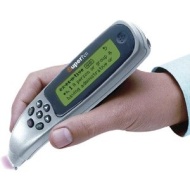

Wizcom SuperPen Professional

Wizcom SuperPen Professional
alaScore 75

45 reviews

May, 2013

We have collected and analyzed 45 user reviews from international sources. Users rate it 63/100. The average review date is Feb 19, 2007. We have compared these reviews to 55167 reviews from other Scanners. The alaScore™ for this product is 75/100 = Good. Last update: May 20, 2013.

Review analysis

(Based on 45 reviews)

User Reviews  

Showing 1 - 10 of 45 Show Reviews: in English

Consumer review by:

Fast , easy to use, OCR much better than most.


Has more memory that you could use, with the option of getting more, excellent software loaded on the pen (dictionary, OCR, voice, etc...) I looked at comparable models before I purchased it. By far the best.

Seemlessly connects to my PDA, and Desktop computer to transfer info gathered during the day

Graphic scanning so so

Consumer review by:

Wizcom Technologies SuperPen Professiona


hard to get started. unclear instructions. software seems old and clunky.

Unclear instructions

Difficult Setup","Poor Software","Slow","Unclear instructions

Consumer review by:

The Pen is Drunk


The Pen is Drunk

I purchased the pen to scan numbers only. That should be simple enough. NOT! The accuracy rate for the pen was about 20%. I could have made better hand written notes drunk. In fact, if the pen acts like a drunk. Not only cannot not copy numbers, just...

ADVERTISEMENT

Consumer review by:

make sure jack is plugged in ALL THE WAY


make sure jack is plugged in ALL THE WAY

Okay, I know it sounds dumb and obvious, but if you can't get the pen to communicate with your PC, make sure to push the cable jack is pushed in completely. I have a film background and am used to using a variety of cables and electronic devices, so...

Consumer review by:

Unusable and Worthless


Unusable and Worthless

Even after the supposed training of the pen, out of 20 scans it did not completely recognize the text once. It is very position sensitive and the technology needs to be significantly improved.

Consumer review by:

Review of WizCom WSP1000P Line Scaner


Review of WizCom WSP1000P Line Scaner

I am using the to take notes for my various on-line and research projects. While the results are about 90% correct, I can usually fill in the blanks, and it is much much better than hand written notes. I would recommend this product to any student or...

Consumer review by:

Please, people, take these negative reviews seriously


Please, people, take these negative reviews seriously

This product is almost impossible to configure with your PC unless you have a PhD in computer science. NOTHING works out of the box...I've tried to follow some of the suggestions that other reviewers have posted with no result. There is little if any...

Consumer review by:

Once you get it to work it is very useful


Once you get it to work it is very useful

As many others, I wasted 2 hours before I got this device (synchronization) to work. As someone said the whole product seems as if they stopped developing 5 years ago. But keep in mind that devices produced some years ago can still be very useful ;)...

Consumer review by:

Works great


Works great

I purchased the superpen mostly for my kids to able to conveniently look up words while reading to help improve their vocabulary. The pen works great at this task and even pronounces the word. The scanning is fairly reliable - most scans work on the...

Consumer review by:

I wish I had not bought it. So far not working. No return call to help from tech support. Tech support? Zip, none, nada


I wish I had not bought it. So far not working. No return call to help from tech support. Tech support? Zip, none, nada

I wish i had not bought it. Complicated and unwieldy install onto xp machine. Tech support. Could not get thru. Said they would call back. Two days later? Nothing. Lets just says service/support rhymes with buck. Save yourselves! Don't buy this product!

Product Specifications

The WizCom SuperPen Professional is the productivity tool. This completely mobile device instantly provides users with the English definitions of over a quarter of a million words. SuperPen Professional can also scan, store and transfer printed data to a PDA, PC or any Windows application making it the perfect tool for busy executive and college student alike. SuperPen Professional enables users to scan professional terms and receive instantaneous definitions from one or a number of the on-board professional dictionaries. Integrated Text-to-Speech technology enables users to pronounce words with confidence. Scan, store and transfer enables users, on the go, to capture essential printed data (text and small images) anytime, anywhere. The product can store over 1,000 pages of printed text, to be transferred to PC or PDA via infra-red, connection at leisure. Users working with their computer can scan printed text directly to the active cursor point. Collected data can be transferred to any Windows based application seamlessly. This completely mobile device instantly provides users with the English definitions of over a quarter of a million words. SuperPen Professional comes complete with a selection of dictionaries from the prestigious Houghton Mifflin Collection including: The American Heritage Dictionary of the English Language The American Heritage Stedmans Medical Dictionary Rogets II: The New Thesaurus The American Heritage Student Science Dictionary The Houghton Mifflin Dictionary of Geography The American Heritage Dictionary of Idioms Dictionary of Computer and Internet Words The American Heritage Abbreviations Dictionary Wall Street Words - Financial and Economical Terms

Dimensions & Weight

Depth:6.4in
Height:0.9in
Weight:3.2oz
Width:1.5in

Header

Compatibility:PC
Manufacturer:Wizcom Technologies
Model:Professional
Packaged Quantity:1
Product Line:Wizcom SuperPen

Scanner

Automatic Duplexing: None
Form Factor:Handheld
Interface Type:RS-232
Interface Type (2nd):Infrared
Max H-Optical Resolution:400dpi
Max V-Optical Resolution:400dpi
Type:Text reader

System Requirements

OS Required:Microsoft Windows 95 / Microsoft Windows 98/ME/2000 / Microsoft Windows Millennium Edition / Microsoft Windows NT/Microsoft Windows 95/98/ME/NT/2000/XP/Microsoft Windows 98 / Microsoft Windows NT / Microsoft Windows 2000 / ME / XP/ Vista
ADVERTISEMENT
ADVERTISEMENT