
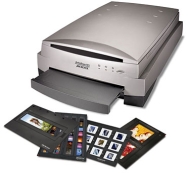

Microtek ArtixScan M1 Pro Dual Media Scanner

Microtek ArtixScan M1 Pro Dual Media Scanner
alaScore 78

13 reviews

May, 2013

We have collected and analyzed 1 expert reviews and 12 user reviews from international sources. Experts rate this product 70/100 and users rate it 57/100. The average review date is Jul 29, 2008. We have compared these reviews to 55174 reviews from other Scanners. The alaScore™ for this product is 78/100 = Good. Last update: May 21, 2013.

Review analysis

(Based on 13 reviews)

Expert Reviews  

User Reviews  

Showing 1 - 10 of 13 Show Reviews: in English

Expert review by:

Review: ArtixScan M1 Pro dual media scanner


With its support for many pro-level transparency types and two full-featured professional software packages, the ArtixScan M1 Pro is a step up, both in quality and in price, from consumer photo and document scanners.

The ArtixScan M1 Pro features an 8.5-by-14-inch reflective scanning bed for 48-bit digitizing of documents and printed photos. It connects to your Mac via USB 2.0. The M1 Pro can also scan transparencies, such as slides and film, in sizes up to 8.5 by...

Consumer review by:

more headaches than its worth


Inadequate support, no Microtek support at retailer of manufacturer, no definitive answers to problems, ...

Looks great sitting on my desk as a paper weight

After using the Microtek M1 scanner I have spent so much time re-scanning images. I keep hoping that if I read just one more article, I'll get a good scan ; The biggest source of headaches has been the colored lines running through the scan

Consumer review by:

Grade "A" Scanner; Grade F Support and Proprietary Software


Grade "A" Scanner; Grade F Support and Proprietary Software

The good news is that this is a great scanner designed to scan film and slides as it's primary objective. I have been looking for a scanner that will do a good job on all of my old negatives and slides of various sizes. And it works as a regular...

ADVERTISEMENT

Consumer review by:

High Quality Scans


High Quality Scans

I based my purchase on other reviews of this product. I found them to be quite accurate. The ArtixScan M1 is not a high-speed device, but does provide high-quality output. I am primarily using it for scanning 35 mm transparancies, and am quite pleased...

Consumer review by:

BUYER BEWARE - READ before buying MICROTEK


BUYER BEWARE - READ before buying MICROTEK

I normally don't write reviews, but in this case I feel compelled to let others know in advance what an important manufacturer has done to cut costs and how this policy affects the buyer/user. We recently learned (the hard way) that Microtek has...

Consumer review by:

Great Product...Questionable Software


Great Product...Questionable Software

The M1 Pro is a fine product that provides excellent quality digitized images of my old Kodachrome 35mm slides that date back to 1953. The software with the unit however required five "uploads" and five "uninstalls" before my new iMac would accept it...

Consumer review by:

great results, can be noisy


great results, can be noisy

Artixscan M1 Pro with ai Studio Flatbed & Film Scanner 4800 Dpi Everything you could possibly need, but definitely for the advance consumer or design pro. The glass face film scanning is great for a good variety of films - better than most dedicated...

Consumer review by:

Microtek sucks!!!!! It should be moved to 1 Star now


Microtek sucks!!!!! It should be moved to 1 Star now

Microtek's M1 is the worst scanner I've used. The 1st one I bought worked great for the 1st set of slides I did. Then, a couple months later, the 2nd set didn't scan the colors correctly by a long shot. Soooo, they had me pay to send it back so they...

Consumer review by:

scanner ok, software not


scanner ok, software not

I have a Microtek scanner and just downloaded the latest drivers. It turns out Microtek wants a program called Scan Finder to load at every start-up, and there is no way to disable this. The product works satisfactorily, but for my money, I will...

Consumer review by:

Scan Finder Loads at startup


Scan Finder Loads at startup

I have a Microtek scanner and just downloaded the latest drivers. It turns out Microtek wants a program called Scan Finder to load at every start-up, and there is no way to disable this. The product works satisfactorily, but for my money, I will...

1
2

Product Specifications

The ArtixScan M1 Pro model is designed to deliver outstanding image quality and higher productivity for scanning tasks. The ArtixScan M1 Pro scanner comes with SilverFast Ai Studio software and two sets of SnapTrans film holders.

Dimensions & Weight

Depth:22.3in
Height:6.2in
Weight:26.5lbs
Width:15.2in

Header

Compatibility:Mac / PC
Manufacturer:Microtek
Model:M1 Dual Media Scanner/M1 Pro Dual Media Scanner
Packaged Quantity:1
Product Line:Microtek ArtixScan

Miscellaneous

Microsoft Certification:Certified for Windows Vista
Vista Certification:Certified for Windows Vista

Scanner

Color Depth:48-bit color
Document Feeder Type:Manual load
Form Factor:Desktop
Input Type:Color
Interface Type:Hi-Speed USB
Max H-Optical Resolution:4800dpi
Max Supported Document Size:Legal (8.5 in x 14 in)
Max Supported Media Size:Legal (8.5 in x 14 in)
Max V-Optical Resolution:9600dpi
Media Feeder Type:Manual load
Supported Document Type:Transparencies / Plain paper / Slides / Film
Supported Media Type:Film / Plain paper / Slides / Transparencies
Type:Film scanner/Flatbed scanner

Service & Support

Type:1 year warranty

System Requirements

OS Required:Apple MacOS X 10.3 - 10.4 / Microsoft Windows 2000 / XP / Microsoft Windows Vista
ADVERTISEMENT
ADVERTISEMENT